42. Úvod do valcovania prsteňov
Šablóna pre nastavenie procesu valcovania prstencov je určená na usmernenie používateľa pri nastavovaní rôznych typov typických procesov valcovania prstencov. Typické nastavenie valcovania prstencov pozostáva z prstenca (obrobku), tlakového valca, trnu a dvoch axiálnych valcov a vyzerá tak, ako je znázornené na obr. 42.1. Šablónu valcovania prstencov je možné použiť aj na nastavenie procesu valcovania železničných kolies; v prípade valcovania železničných kolies sú povolené jeden behúňový valec, dva stredové valce a dva axiálne valce, ako je znázornené na obr. 42.2. Proces valcovania prstencov je možné nastaviť v dávkovom režime alebo v interaktívnom režime spolu s operáciami prenosu tepla a tvárnenia. Objekt obrobku je možné preniesť z iných operácií do šablóny valcovania prstencov, kde je možné vykonať potrebné nastavenia siete a procesu na simuláciu procesu.
Pre obrobok/krúžok a matrice je možné použiť iba sieť typu „brick“. Počas behu simulácie sa obrobok rozťahuje a súbor so správami sa aktualizuje o informácie, ako sú aktuálny maximálny polomer, aktuálny uhol otáčania a celkový počet otáčok atď. Simuláciu je možné zastaviť aj na základe priemeru obrobku. Šablóna obsahuje ďalšie možnosti na uplatnenie obmedzení posunu obrobku, čím sa zabezpečí jeho stabilita počas simulácie.
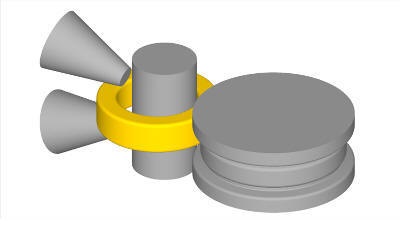
Nastavenie valcovania prsteňov
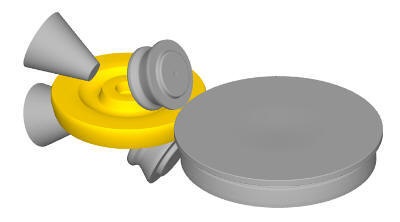
Nastavenie valcovania železničných kolies
Nastavenie prevádzky valcovania prsteňov
Proces valcovania krúžkov je navrhnutý na základe nasledujúceho systému (platí aj pre valcovanie železničných kolies):
-
Objekt 1 je deformujúci sa objekt.
-
Obrobok alebo valce sa vždy definujú ako objekt 1 a následne sa definujú valce.
-
V nastavení valcovania prstencov/železničných kolies by sa malo zachovať poradie objektov
-
Železničné vozidlá sú vyrobené z tvrdeného plastu.
-
Valce sú počas simulácií valcovania tuhé telesa.
-
Os valenia je v smere osi Z.
Prehľad pracovných krokov zariadenia na valcovanie prstencov je znázornený na obr. 42.3.
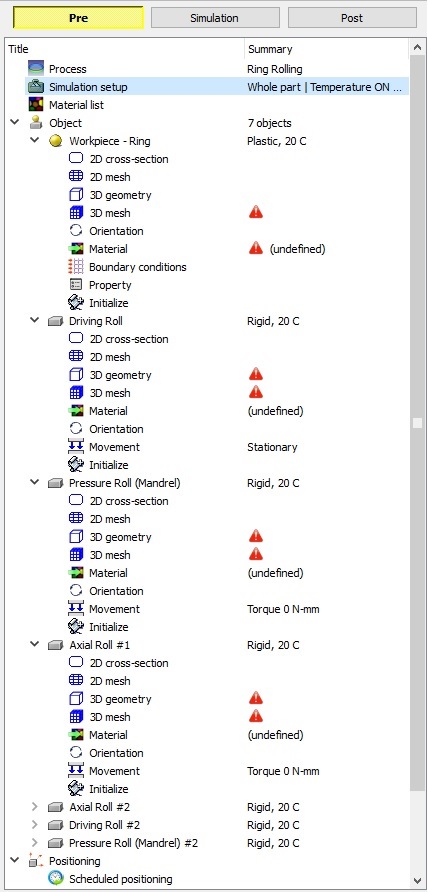
Strom objektov pre nastavenie valcovania prsteňov
Súvisiace témy: