Appendix XXI: FEM User routine support
AXXI.1. Introduction
AXXI.2. Download
AXXI.3. Installation
AXXI.4. DEFORM User Routine Compilation
Introduction
DEFORM V13.1 brings with it a few important changes in its support for Fortran compilers. Historically, SFTC has relied upon the Absoft Fortran compiler for DEFORM release and user routine code compiling. The Absoft Corporation closed their business in late 2022, ending sales and support for the Absoft Fortran Pro compiler. SFTC has committed to continuing to support the Absoft compilers for a period of time as the Absoft compiler is phased out.
DEFORM V13.1 introduces support for Intel® Fortran Compiler. The free Intel compiler represents a computing upgrade, as it is designed for modern hardware. Testing has shown that it generally provides improved performance over the older Absoft compiler.
This document serves as a guide on how to download, install and utilize the Intel® Fortran Compiler to compile DEFORM user routines.
Download
The free Intel® Fortran Compiler can be found at:
https://www.intel.com/content/www/us/en/developer/tools/oneapi/fortran-compiler.html#gs.nrbz99
Users can either download the Intel oneAPI base or HPC Toolkit, which both include the Fortran Compiler.
Users can also download the stand alone version of Intel® Fortran Compiler, based on their operating system, as listed here:
https://www.intel.com/content/www/us/en/developer/articles/tool/oneapi-standalone-components.html#fortran
Installation
During the installation, be sure to check the Intel® Fortran Compiler & Intel® Fortran Compiler Classic(See Fig. AXXI.1).

Intel Fortran Compiler & intel Fortran Compiler classic selection
Intel® Fortran Compiler requires Microsoft Visual Studio 2019 or later versions to be preinstalled on the computer. During the installation, there will be a system check for Microsoft Visual Studio, as captured below Fig. AXXI.2.
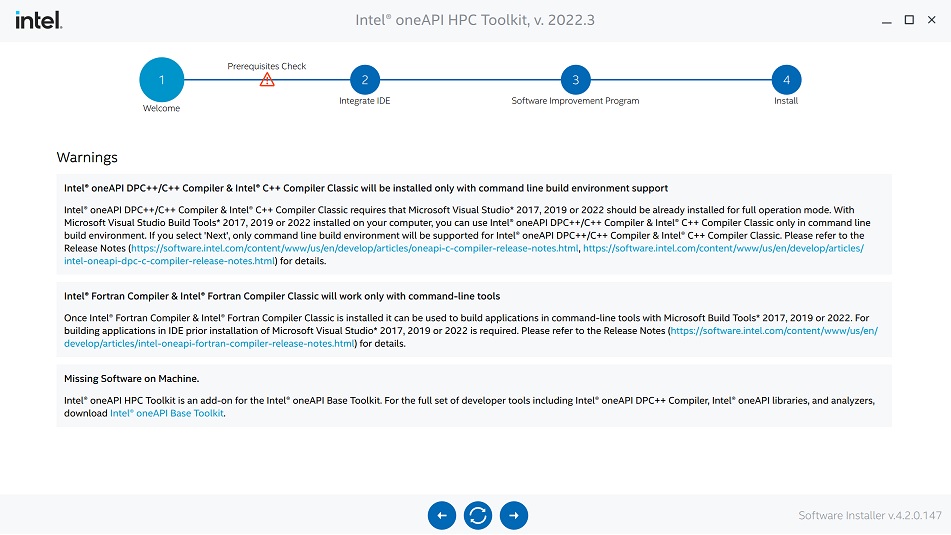
Intel Prerequisites check
DEFORM User Routine Compilation
Once installation is completes, the user can then compile DEFORM user routines with Intel® Fortran Compiler. The “
1. The first folder is called “DEF_SIM”, as in previous DEFORM releases, which allows for compiling of an FEM executable (.exe) via a static link library. This folder contains static link batch (.bat) files for the Absoft and Intel compilers (See Fig. AXXI.3.).
The Absoft batch file is similar to that from past releases. When the preferred batch file is executed, DEF_SIM_64.EXE will be compiled with the Fortran (.f) user routine files and the static link library found in this directory. The released DEF_SIM_64.EXE should be replaced with the customized DEF_SIM_64.EXE, after first making a copy of the released executable.
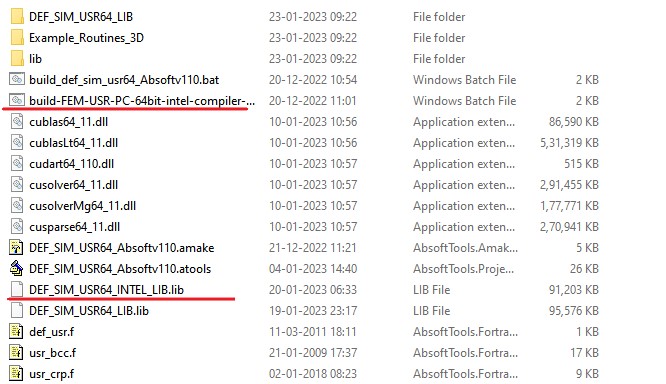
UserRoutine DEF_SIM folder
2. The second folder is called “DEF_SIM_DLL”, which allows for compiling of user routines as dynamic link library (.dll) files. This folder contains dynamic link batch files for the Absoft and Intel compilers (See Fig. AXXI.4.) .
When the preferred batch file is executed, .dll files will be compiled with the Fortran (.f) user routine files found within this directory. The resulting .dll files and the Intel DEF_SIM_64.EXE (located in “<2D or 3D>\DEF_SIM_64\Intel_modern”) should be copied to a new folder. DEF_SIM_DIR.DAT should then be edited to specify the new folder as the location for the customized DEFORM implementation. Please note that either Absoft or Intel compiled .dll files may be linked with the Intel DEF_SIM_64.EXE.
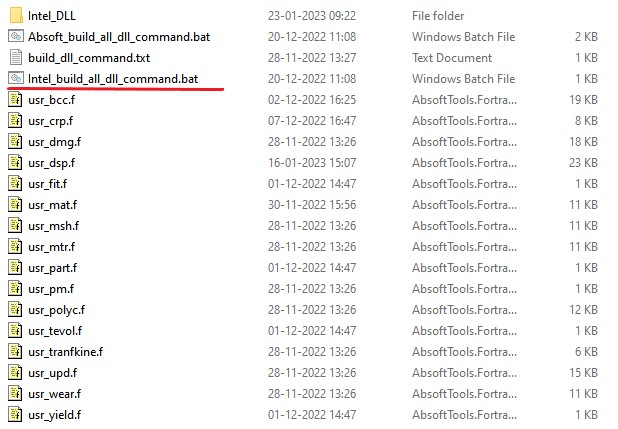
UserRoutine DEF_SIM_DLL folder
- Please note that user needs to specify the version number of Microsoft Visual Studio installed on their computer before compiling the program using the build-FEM-USR-PC-64bit-intel-compiler-2022.bat or Intel_build_all_dll_command.bat file. In the example .bat file provided, the Visual Studio version is set to 2019 using the following command:
call “C:\Program Files (x86)\Intel\oneAPI\setvars.bat” intel64 vs2019
User should update this command to match the version of Visual Studio that has been installed on the computer. For example, if Visual Studio 2022 is installed, user would update the command as follows:
call “C:\Program Files (x86)\Intel\oneAPI\setvars.bat” intel64 vs2022