33. Úvod do tvarovania
Tvarovanie je výrobný proces, pri ktorom sa kov tvaruje pôsobením bodových tlakových síl.
Systém kovania zahŕňa všetky vstupné premenné, ako sú sochor alebo polotovar (geometria a materiál), nástroje (geometria a materiál), podmienky na rozhraní nástroj/materiál, mechanika plastickej deformácie, použité zariadenia, vlastnosti konečného výrobku a napokon prostredie závodu, v ktorom sa proces vykonáva.
Operácia tvárnenia slúži na pochopenie smeru toku kovu, rozsahu deformácie a rozloženia teploty. Pri operácii tvárnenia je možné počas simulácie sledovať vady, ako sú trhliny a záhyby.
Ako pridať operáciu tvarovania
Operáciu tvárnenia je možné otvoriť prostredníctvom sprievodcu integrovaným výrobným procesom (MO), ktorý sa spúšťa z hlavného grafického rozhrania. Operáciu tvárnenia je možné pridať v sprievodcovi MO na karte „Explorer“ kliknutím na tlačidlo  vedľa položky „2D alebo 3D tvárnenie“, ako je znázornené na obr. 33.1. Používateľ ju môže pridať aj pomocou funkcie drag and drop do editora operácií.
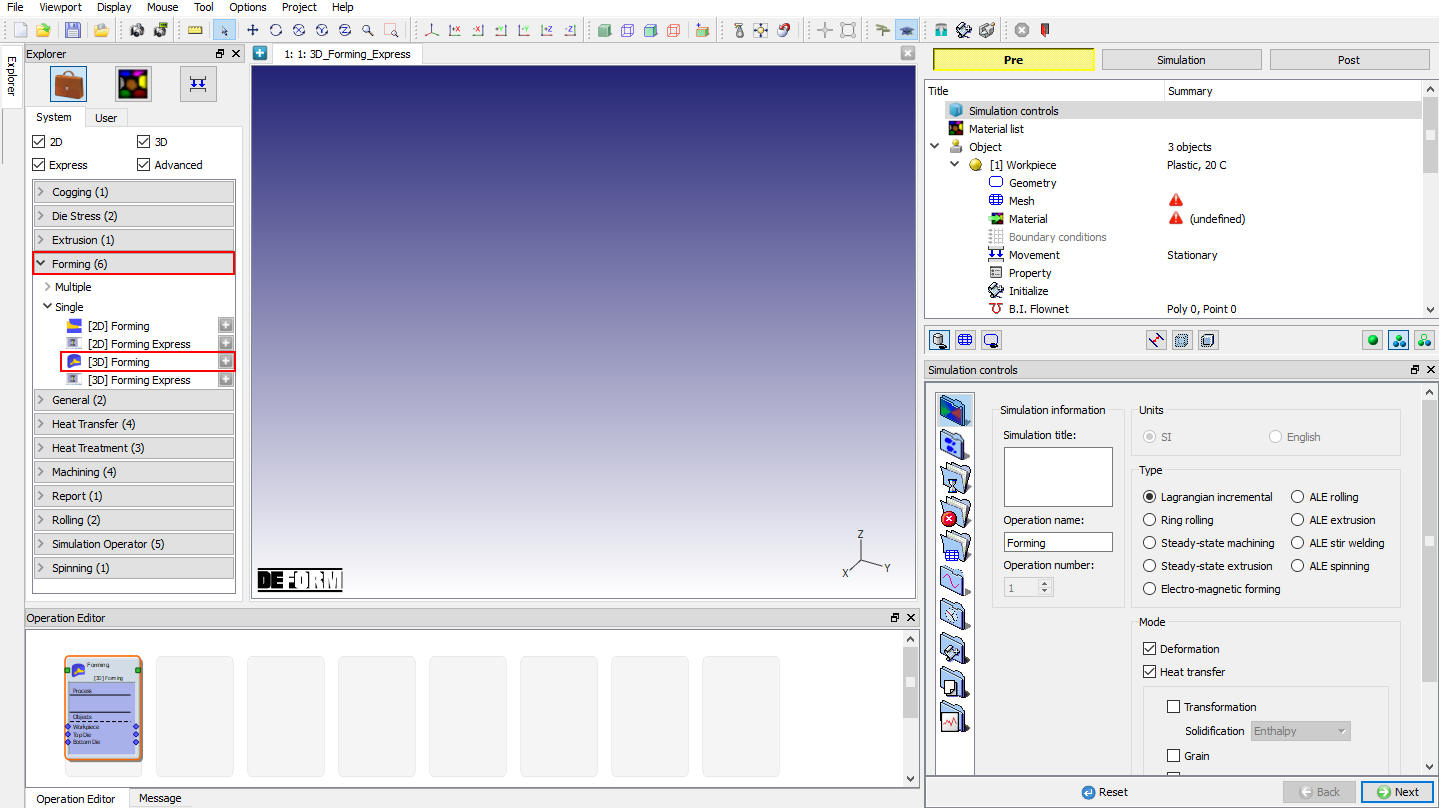
Do Editoru operácií bola pridaná operácia 3D tvarovania
Integrovaný výrobný proces (MO) je rozdelený na niekoľko samostatných častí – konkrétne na okno DISPLAY, grafické nástroje, strom operácií, editor vlastností, editor operácií, prehliadač a grafické okno. Ďalšie informácie nájdete v 6.1. Integrated Manufacturing Process Pre- Processor Layout.
V procese integrovanej výroby (MO) sú k dispozícii tri režimy: Pre-Processor, Simulator a Post-Processor. Tieto tri režimy je možné navzájom prepínať pomocou výberu na karte. Predspracovateľ slúži na nastavenie úlohy pre simuláciu, simuláciu je možné spustiť v sekcii Simulátor a výsledky sa zobrazujú v postspracovateľovi. Ak je potrebné vykonať zmenu v simulácii, táto zmena by sa mala vykonať v predspracovateľovi. Simulátor je miesto, kde sa simulácia spúšťa a monitoruje. Postprocesor disponuje mnohými nástrojmi na zobrazenie a interpretáciu výsledkov simulácie.
Cieľ formovacej operácie
Jednoduché operácie tvárnenia je možné nastaviť v režime s návodom, zatiaľ čo zložité operácie a pokročilé možnosti je možné nastaviť v režime pre pokročilých. Používateľ môže v režime pre pokročilých nastaviť zložité úlohy, ako sú valcovanie, prenos tepla, výdrž, zrno, fázová premena, extrudovanie atď.
Operácia formovania v MO je podobná predspracovateľovi, kde si používateľ môže nastaviť akýkoľvek typ úlohy. (Pozri obr. 33.2 a obr. 33.3.)
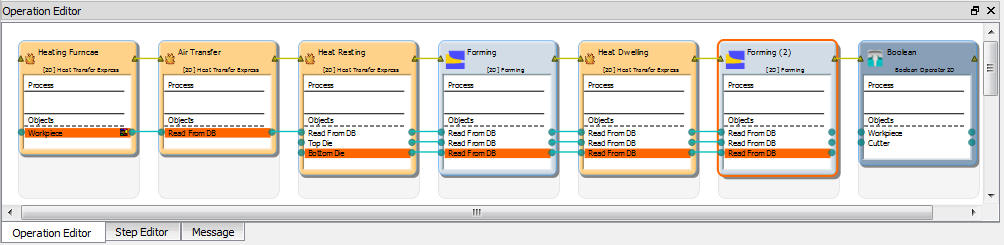
Príklad nastavenia postupných operácií v 2D
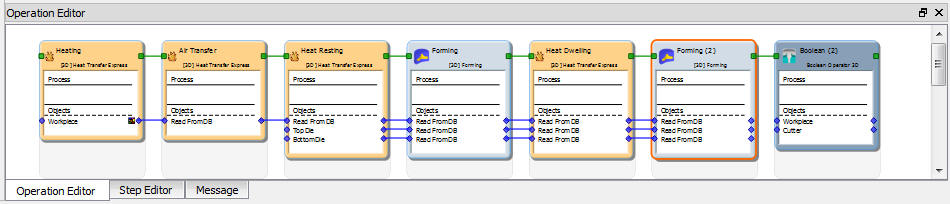
Príklad nastavenia postupných operácií v 3D
Súvisiace témy:
6.1. Integrated Manufacturing Process Pre- Processor Layout
6.2. Integrated Manufacturing Process.Simulation layout
6.3. Integrated Manufacturing Process Post - Processor layout