Príloha XX: Ako vykonať analýzu napätia v spojenej matici pre 3D modely
*Z rozhrania QT3
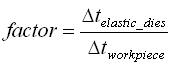
Od verzie 3D V10.0+ systém podporuje pohodlný spôsob vykonávania analýzy napätia v lisovacej forme pomocou metódy viacnásobného krokovania (MTS). Súčasná štruktúra využíva lokálny súbor DAT (DEF_LCDSTS.DAT) na spustenie týchto postupov. Pri typickej analýze napätia v lisovacej forme, keďže na objektoch lisovacej formy sú potrebné systémy s jemnou sieťou, sú modely náročné na pamäť a vyžadujú dlhý výpočtový čas. Postupy vyvinuté v programe DEFORM umožňujú používateľovi špecifikovať rôzne veľkosti časových krokov pre plastický obrobok (deformácia) a elastické lisovacie formy (analýza napätia v lisovacej forme), čo pomáha šetriť výpočtový výkon procesora. Používateľ môže špecifikovať voľne prepojenú analýzu napätia v lisovacej forme na pružných nástrojoch len vo vybraných krokoch, a nie v každom kroku. To poskytuje primeranú rovnováhu medzi prepojeným napätím a efektívnymi výpočtovými časmi. Tento faktor definuje pomer viacnásobných časových krokov, napríklad:
V súčasnosti musí model spĺňať nasledujúce požiadavky, aby bolo možné využívať tieto analytické funkcie.
-
Mriežky by mali byť pružné a mali by používať tetraedrickú sieť.
-
Pre lisovacie formy by mali byť v dialógových oknách BCC definované podmienky pohybu.
-
Pohyb foriem by mal byť špecifikovaný v dialógových oknách na ovládanie pohybu.
Existuje niekoľko možností prepojenia interakcií medzi obrobkom a nástrojom. V každom prípade model ukladá výsledky do tej istej databázy. Ide o:
| Možnosť | Spôsob riešenia | Aktualizácia napätia | Aktualizácia geometrie |
|---|---|---|---|
| 1 | Plne prepojené | Forma a obrobok | Forma a obrobok |
| 2 | Jednosmerné spojenie | Forma a obrobok | Forma a obrobok |
| 3 | Jednosmerné spojenie | Matrica a obrobok | Iba obrobok |
Možnosti interakcie medzi obrobkom a nástrojom pri spojovaní
-
Pojem „plne prepojené“ znamená, že vychýlenie nástroja sa premieta do deformácie obrobku v aktuálnom kroku.
-
Jednosmerná väzba znamená, že napätia sa počítajú v nástroji. Ak sa geometria matrice aktualizuje, na tvare obrobku sa to prejaví až v nasledujúcom kroku.
-
Ak sa použije možnosť 3, napätie sa vypočíta v matrici, geometria matrice sa však nikdy neaktualizuje.
Ak chcete aktivovať analýzu napätia čipu s voľným prepojením, vytvorte pomocou textového editora (napr. Poznámkový blok) súbor s názvom DEF_LCDSTS.DAT v tom istom adresári, v ktorom sa nachádza databáza.
Obsah súboru DAT je nasledovný:
Riadok 1: = Možnosť spojenia (1, 2 alebo 3)
= 1 pre úplné prepojenie
= 2 pri jednosmernom prepojení (geometria formy je aktualizovaná, na tvare obrobku sa to prejaví až v nasledujúcom kroku)
= 3 v prípade jednosmerného prepojenia (geometria čipu sa nikdy neaktualizuje)
Riadok 2: = n, pomer časových krokov pre spojenie napätia (Δt_elastic_dies/Δt_plastic_workpiece).
Riadok 3: = m, pomer tepelných časových krokov pre teplotné prepojenie (Δt_elastic_dies/Δt_plastic_workpiece).
Napríklad:
Riadok 1 so záznamom 1, pre možnosť 1 – možnosť s úplným prepojením.
Hodnota n = 5 v riadku 2 znamená, že spriahnuté výpočty sa vykonávajú každých 5 krokov a pri každom piatom kroku sa veľkosť kroku pre elastický objekt nastaví na päťnásobok veľkosti kroku v porovnaní s plastickým obrobkom.
Hodnota m = 5 v riadku 3 znamená, že veľkosť časového kroku použitá pri tepelných výpočtoch je 5-násobkom veľkosti časového kroku použitého pri výpočtoch deformácií.
Typický súbor DEF_LCDSTS.DAT pre možnosť 1 – Plne prepojený núdzový režim by mohol vyzerať takto:
1
5
5
Kritériá výberu pre možnosti analýzy napätia v matrici:
Možnosť 1 – Vo všeobecnosti je možnosť 1 najpresnejšia, ale zároveň najnáročnejšia z hľadiska výpočtového výkonu. Možnosť 3 je z hľadiska výpočtového výkonu najmenej náročná a ponúka najväčšie zjednodušenie procesu.
Varianta 2 – je z hľadiska výpočtov efektívnejšia ako varianta 1, avšak môže spôsobiť určité nezrovnalosti v polohe povrchu obrobku (a tým aj v objeme obrobku), ak je zmena tvaru formy podstatná.
Možnosť 3 – Ak ide výlučne o namáhanie nástroja, možnosť 3 je spravidla postačujúca. Ak je dôležitá deformácia nástroja, treba zvoliť možnosť 1 alebo 2.
V prípade schématického usporiadania znázorneného nižšie (pozri obr. 1) sa porovnávajú výsledky napätia v matrici pre všetky tri varianty (pozri obr. 2).
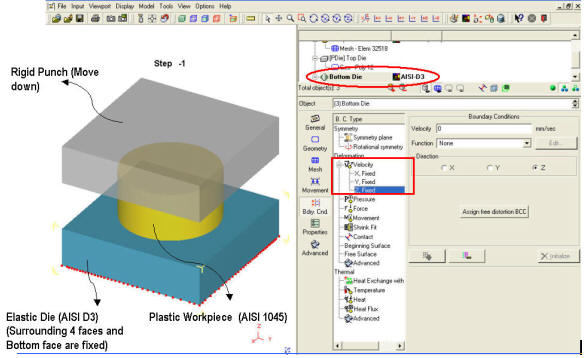
Jednoduché nastavenie úlohy o napätí v spojenej matrici pre spodnú matricu
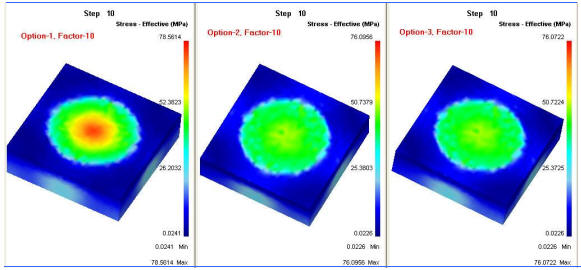
Porovnanie výsledkov odľahčenia formy pre všetky tri možnosti v tom istom kroku
Súvisiace témy: